
PesaMirror

KSh0.00
Wishlist Compare
Tag :

Description

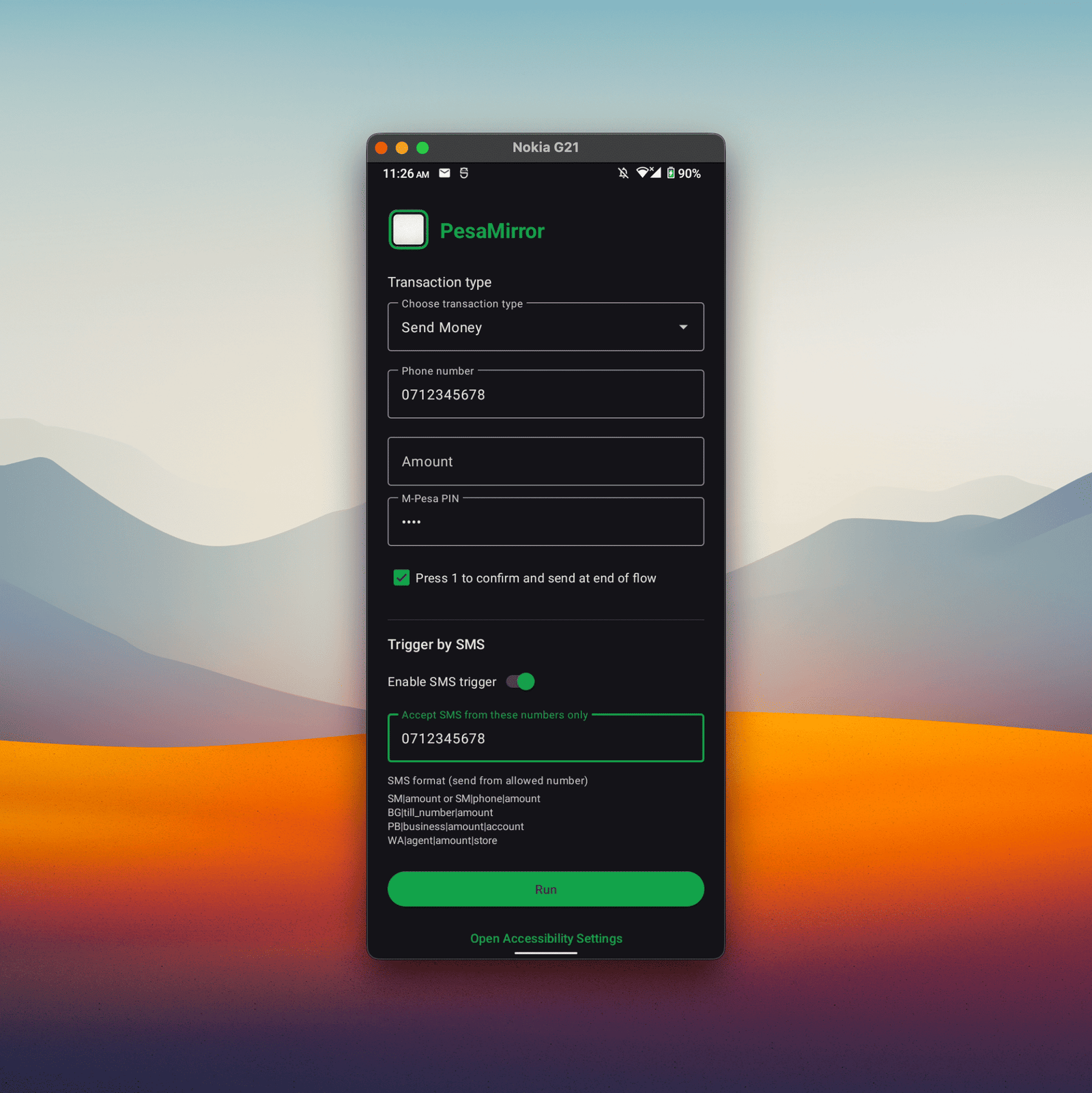
Automate M-Pesa USSD (*334#) flows on Android — Send Money, Paybill, Till Number, and Withdraw Cash. Fill the form, tap Run, and the app guides the USSD session for you.

Strictly for personal use only. Works fully offline; your M-Pesa PIN is stored securely on device only.

Product Features

  • Transaction types
    • Send Money (phone + amount)
    • Paybill (business + account + amount)
    • Till / Lipa na M-PESA (till number + amount)
    • Withdraw Cash (agent + store + amount)
  • Accessibility-driven automation — reads the USSD menu and enters your choices.
  • Optional “Press 1 to confirm” — app can send the final confirmation for you, then close the USSD screen after the result.
  • SMS trigger — run USSD from allowed numbers by sending a formatted SMS (e.g. SM|amount for send money).
  • Remote Push trigger — trigger USSD from the PesaMirror web app via Firebase Cloud Messaging (FCM). Stateless — works even when the Android app is killed


Intended use

  • Personal use only — not for commercial or shared use.
  • Best suited for older phones (under Android 12) — where USSD automation is most practical.
  • Safest if used on a second phone with a second number — a device and SIM you don’t use for daily banking, so exposure is limited.
  •  

How To Install

  1. Clone the repo:
    git clone https://github.com/davidamunga/pesamirror.git
    cd pesamirror
     
  2. Open in Android Studio (or use Gradle from the command line).
  3. Build and run on a device or emulator:
    ./gradlew assembleDebug
     

    Install the APK from app/build/outputs/apk/debug/, or run from Android Studio.

Quick install on device (script)

The easiest way to install PesaMirror on a physical device the first time is to run the install script from the repo root:

./scripts/setup.sh
 

The script checks for ADB and Java (JDK 11+); if either is missing, it prints install instructions and download links for your OS (macOS, Linux, or Windows). If no device is detected, it guides you through enabling Developer options and USB debugging on your phone. Then it builds and installs the debug app on the connected device and reminds you to enable PesaMirror in Settings → Accessibility after opening the app.

Windows users: Install Android Platform Tools (ADB) and Adoptium Temurin JDK 11 (Java). You can run the script from Git Bash, or open the project in Android Studio and use Run, or run gradlew.bat installDebug from Command Prompt in the repo root.

Installing from an APK (side-loading)

If you install PesaMirror from a downloaded APK (e.g. from Releases) rather than the Play Store, Android will block the install by default. You need to allow installation from unknown sources for the app you use to open the APK (browser, file manager, etc.):

  • Android 8+: Settings → Apps → select the app (e.g. Chrome, Files) → Install unknown apps → turn Allow from this source on.
  • Older Android: Settings → Security → enable Unknown sources (or Install unknown apps).

Then open the APK again and confirm Install.

Risks & disclaimer

  • This app automates USSD and can perform real M-Pesa transactions using your PIN. Any mistake or misuse can lead to real money movement.
  • Use only if you understand and accept these risks. Keep your PIN private; never share it.
  • The developer is not responsible for any loss, misuse, or damage. You use the app at your own risk.
  •  

Loading...